WhatsApp AI chatbot for customer support and sales

ReplyCX connects to your WhatsApp Business API number, answers customers from a knowledge base you train, sends Meta-approved template messages and passes the chat to your team when a person is needed.

Example WhatsApp conversationWhatsApp
  1. Hi, can I change the delivery address on my order?
    09:14
  2. Yes. Addresses can be changed until the order ships. Send me your order number and I'll check where it is.
    09:14 · AI answer from knowledge base
  3. It's 4471. I'd also like to talk to someone about a refund.
    09:15
  4. 09:15 · Human handover to Support team

  5. Hi, Priya from Support here. I can see order 4471 and everything above. Let's sort out that refund.
    09:16 · Agent, Support team

What happens behind each message

  1. 01

    The trigger listens on your number

    Each bot starts from a Trigger block where you pick the WhatsApp Business number it answers on.

  2. 02

    AI Studio writes the answer

    Replies come from the knowledge base you trained, so the bot answers with your policies and product details.

  3. 03

    Human handover passes the chat on

    The conversation goes to the team you choose, with set messages for when no agent is free or it is outside operating hours.

  4. 04

    Your team picks up with context

    With auto-assign on, the chat goes straight to an agent. Otherwise it waits in the Unassigned tab, and every user gets a browser notification.

Illustrative conversation showing how the flow blocks work. Not customer data.

What the WhatsApp chatbot can do

AI answers, no-code flows and the template tools Meta requires for proactive messages, in one workspace.

Train it on what you already have

Add your website, documents or pasted text. AI Studio uses these sources to write its WhatsApp replies.

  1. Domain or sitemap import

    Enter a domain or sitemap address and ReplyCX imports its URLs, or list specific pages.

  2. Files up to 5 MB

    CSV, XLSX, TXT, PDF, DOC and DOCX.

  3. Text snippets

    Paste up to 2,500 characters straight into the knowledge base.
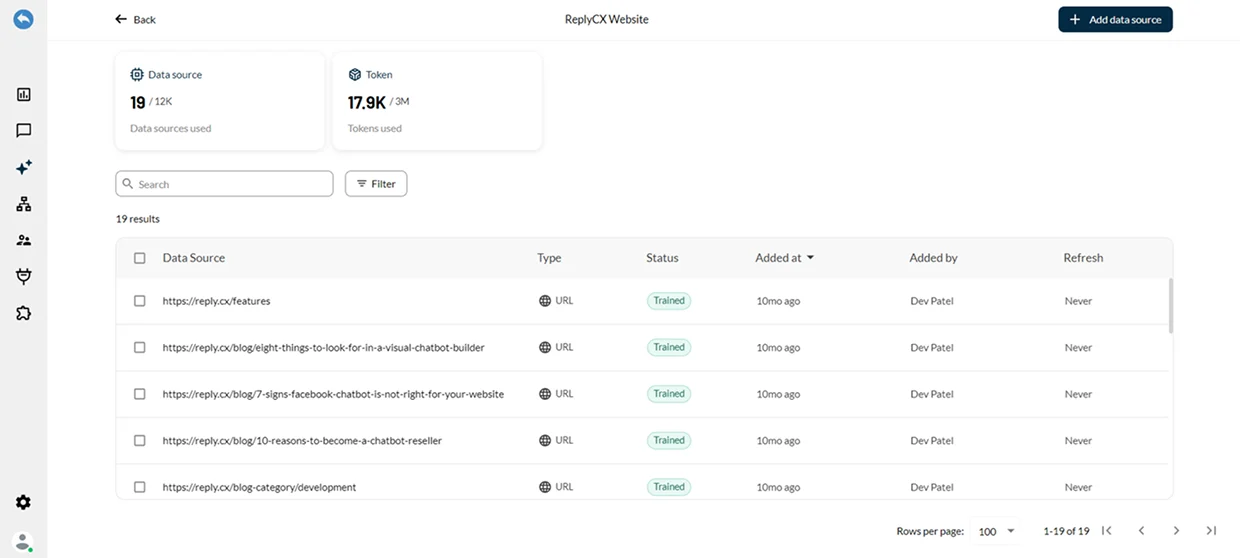
ReplyCX AI Studio knowledge base listing trained website data sources
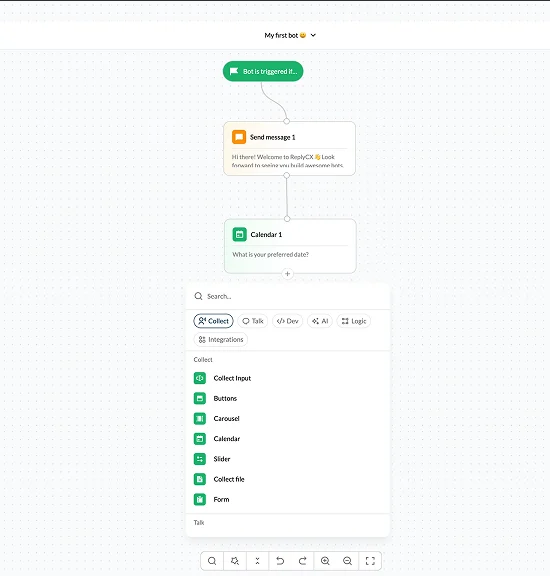
ReplyCX visual bot builder with trigger, message and calendar blocks

Build the flow without code

Drag blocks onto a canvas to collect input, show buttons and carousels, book dates, call AI and connect integrations.

  1. WhatsApp Flows

    Open structured, multi-screen forms built in Meta's WhatsApp Flow builder inside the chat.

  2. Product catalog

    Customers browse products, pick items and add them to a cart without leaving WhatsApp.

  3. Send Template block

    Send approved rich templates, including carousels, in the middle of a live bot conversation.

Template and campaign tools

  1. 01

    Template manager

    Create templates, submit them for Meta's approval and track whether each one is accepted or rejected.

  2. 02

    Template sync

    Moving from another platform? Import your existing Meta templates with the Sync button.

  3. 03

    Carousel templates

    Swipeable templates with 2 to 10 cards and up to 2 buttons on each card.

  4. 04

    Outbound campaigns

    Send appointment confirmations, payment reminders, surveys and opted-in promotions from outbound bots, with link tracking.

  5. 05

    Marketing Messages Lite API

    Outbound bots support Meta's MM Lite API for marketing messages.

  6. 06

    One inbox across channels

    WhatsApp sits beside web chat, SMS and email, and context carries over when a customer switches channel.

Set up a WhatsApp chatbot in four steps

The bot runs on a WhatsApp Business API number. Connect your own Meta number, or test first with a 360Dialog sandbox number.

  1. 01Verify your Meta Business Manager
  2. 02Add your number to a Meta app
  3. 03Connect the number in ReplyCX
  4. 04Pick it in the bot trigger and deploy

Before you start

  1. A verified Business Manager

    Meta needs your business to be verified by Facebook.

  2. A number not on the WhatsApp app

    The number cannot have an active WhatsApp account linked to it.

  3. A permanent access token

    Generated for a system user in Meta Business settings, with WhatsApp management and messaging permissions.

  4. Templates for proactive messages

    Messages you start, such as reminders, use templates Meta has approved.

What it costs

  1. ReplyCX plan

    Plans start at $79 a month, priced by conversation volume, and every plan starts with a 14-day free trial.

  2. AI answers

    AI Studio and custom knowledge base training are on the Pro and Enterprise plans.

  3. Human handover

    Live chat handoff starts on the Growth plan.

  4. Meta's fees

    Meta charges separately for WhatsApp Business API messages. Rates vary by country and message type.

Keyword opt-out management (STOP and START) is available for SMS only, so build WhatsApp opt-outs into your flow.

ReplyCX unified our WhatsApp, SMS, and email. Customer response time dropped 80%, satisfaction soared.
Sarah K. · COO, E-commerce Brand

WhatsApp chatbot questions

  • A WhatsApp AI chatbot is software that replies to customers on a business WhatsApp number. In ReplyCX, the bot runs on the WhatsApp Business API, writes answers from a knowledge base you train in AI Studio, follows flows you build without code and hands the chat to a person when needed.

Put your WhatsApp number to work.

Start a 14-day free trial, or book a demo to plan your first flow.

Start free trial