Using WhatsApp for Support? Why You Still Need a Ticketing System

Table of Content


A customer messages your WhatsApp at 9 AM about a refund. Three agents see it. Two reply with different answers. One marks it resolved. The customer, still waiting for the actual refund, messages again the next morning. But this time, the agent who had all the context is on leave, and their phone has the only copy of the conversation.
The problem here isn’t WhatsApp. Your customers love it, your team is comfortable with it, and it’s where conversations happen naturally. The problem is that WhatsApp handles the conversation layer brilliantly but has no management layer underneath it. There’s no tracking, no routing, no assignment, and no way to ensure that every request resolves, instead of just a reply.
That’s what a ticketing system provides. Not a replacement for WhatsApp, but the structure underneath it, turning conversations into trackable, assignable, measurable units of work, so nothing slips through the cracks.
This article explains why WhatsApp alone isn’t enough for growing support teams, what a ticketing system adds to the picture, and how to layer one onto the channels your customers already love without disrupting anything.
Key Takeaways
Is WhatsApp enough for customer support? WhatsApp is the channel your customers love. But it’s a messaging tool, not a support management system. You need both.
When should I add a ticketing system? When you’re handling more than a few dozen requests per day, have multiple support staff, or operate across more than one channel.
What does a ticketing system add to WhatsApp? Tracking, routing, assignment, SLA enforcement, full reporting, and conversation history that never vanishes, all while keeping WhatsApp as the customer-facing channel.
Do my customers have to change anything? No. Customers keep messaging on WhatsApp exactly as they always have. The ticketing system works entirely behind the scenes.
Why Is WhatsApp the Default Channel for Customer Support?
WhatsApp is the world’s most popular messaging app, with over 3 billion monthly active users across nearly every market. Messages enjoy 98% open rates, and more than half of consumers prefer messaging a business over calling or emailing. For a startup or small team, it’s the obvious first channel.
And it works. Customers message you on a channel they already use every day. You reply instantly from your phone. It’s personal, fast, and free.
None of this changes when you add a ticketing system. WhatsApp stays exactly where it is, as the front door for customer conversations. The ticketing system adds the backend: tracking, routing, and reporting that WhatsApp was never designed to handle. Think of it like a restaurant. WhatsApp is the dining room where customers sit. The ticketing system is the kitchen that makes sure every order gets prepared, tracked, and delivered to the right table.
What Gaps Does WhatsApp Leave in Your Support Operation?
WhatsApp Business was built for messaging, not for managing a support operation. That’s not a flaw. It’s simply not what the tool was designed for. A ticketing system fills each of these gaps:
- Single-device access. Only one person can use the WhatsApp Business app per device. A ticketing system lets your entire team work simultaneously from a shared dashboard.
- No centralized history. Conversations live on individual phones. A ticketing system stores every interaction in the cloud, permanently.
- No reporting. WhatsApp offers no way to track response time, resolution rates, or agent performance. A ticketing system measures all of it.
- Limited automation. WhatsApp’s auto-replies are basic. A ticketing system adds workflow engines, conditional routing, escalation triggers, and AI-assisted replies.
- No ticket tracking. No unique ID, no status field, no priority tag. A ticketing system turns every conversation into a trackable, prioritized record.
- No integrations. WhatsApp sits in isolation. A ticketing system connects to your CRM, knowledge base, and analytics tools.
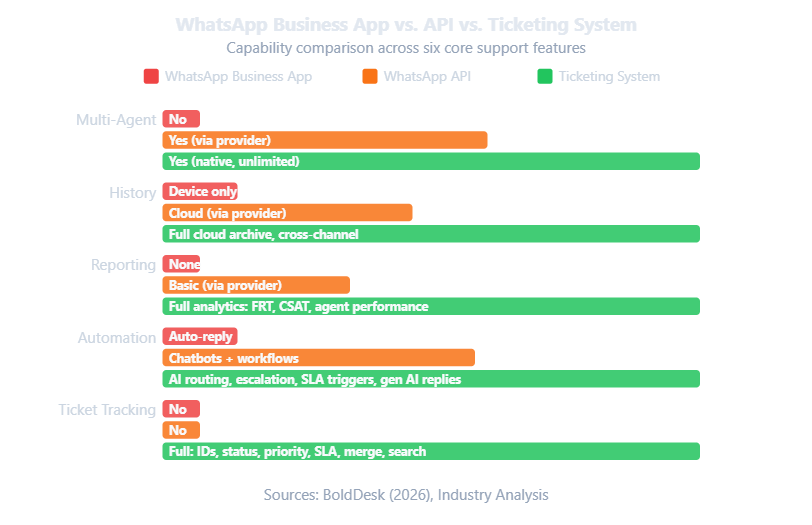
The WhatsApp Business API unlocks multi-agent access and automation through a third-party provider. But even with the API, you still don’t get ticket tracking, SLA enforcement, or unified multi-channel management. The API improves WhatsApp’s capabilities. A ticketing system completes them.
How Does a Ticketing System Work With WhatsApp?
This is the setup that makes everything click. WhatsApp stays as the customer-facing channel. The ticketing system sits behind it as the management layer. Your customers don’t notice a thing. Your team gets superpowers.
- A customer sends a WhatsApp message about an order issue.
- The ticketing platform creates a ticket automatically through automated ticket creation and routing, assigning a unique ID, categorizing the request, and routing it to the right agent.
- The agent replies from the ticketing dashboard. The customer sees the reply in their WhatsApp conversation.
- If the customer follows up by email two days later, that message gets attached to the same ticket. Full context preserved.
- The manager can see the complete timeline: first response time, resolution time, channels used, and satisfaction score.
Enhance this flow further by deploying an AI-powered chatbot that handles routine queries instantly on WhatsApp and routes complex ones to human agents with full context.
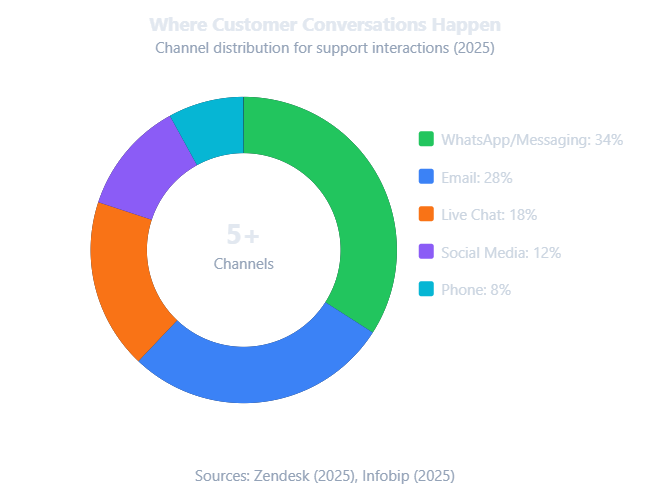
This is what omnichannel support across all channels actually means. Not “we’re available on multiple channels” but “all our channels feed into one system, and no matter where a customer reaches out, we have the full picture.”
What Happens When WhatsApp Alone Isn’t Enough?
WhatsApp handles conversations. It doesn’t manage them. When volume exceeds your team’s ability to track manually, problems compound:
- Messages get buried. Agents scroll endlessly trying to figure out which conversations still need a reply.
- Duplicate replies. Without assignment tools, two agents respond to the same customer while another sits unanswered.
- Context vanishes when people leave. Conversations on personal devices are gone the moment an employee moves on.
- Customers repeat themselves. Without a shared record, every interaction starts from scratch.
- You can’t measure anything. No data on response time, resolution rate, or agent performance.
The Breaking Point Calculator: If you hit two or more of these thresholds, your WhatsApp support needs a ticketing system underneath it.
And there’s a risk most businesses overlook: compliance. When customer conversations live on personal devices with no audit trail, a ticketing system solves this by storing every conversation centrally with full access controls.
What Does a Ticketing System Add That WhatsApp Can’t Provide?
A ticketing system converts every customer request into a structured, trackable record with a unique ID, an assigned owner, a priority level, a status, and a full conversation history:
- Ticket creation. Every incoming message becomes a ticket automatically, regardless of channel.
- Assignment and routing. Tickets go to the right person based on category, skill, workload, or custom rules.
- Priority and SLA management. Tag tickets by urgency. Attach SLA timers so high-priority tickets escalate automatically.
- Status tracking. Every ticket moves through: Open, In Progress, On Hold, Resolved, Closed.
- Conversation history. Full record across every channel, preserved in one place.
- Reporting and analytics. Measure everything through your support analytics dashboard: FRT, resolution time, agent performance, CSAT, volume trends.
What we’ve observed: Businesses that add a ticketing system to their existing WhatsApp support see three consistent patterns within the first 90 days. Repeat contacts drop by roughly a third. Agent stress decreases because the workload is distributed fairly. And customer satisfaction rises because nobody has to explain their problem twice.
How Is a Ticketing System Different From a Shared Inbox?
A shared inbox is where conversations accumulate. A ticketing system is where they get assigned, tracked, and resolved. The average knowledge worker spends an estimated 28% of the workweek managing email. A ticketing system reclaims much of that time.
What Does It Cost to Add a Ticketing System?
Less than you think. Industry estimates put the cost of manually resolving a single support ticket at around $22, factoring in agent time, context switching, and follow-up. Automated ticketing brings that down to under a dollar. That gap widens every month as volume grows.
When comparing platforms, explore best alternatives to legacy tools to find the right balance of features and price.
How Do You Add a Ticketing System to Your WhatsApp Support?
A phased approach works best. You’re not ripping out WhatsApp. You’re layering a management system underneath it.
Week 1-2: Audit your current state. Count daily requests across all channels. Measure response time and repeat contact rate. Document pain points.
Week 2-3: Set up your ticketing system. Create ticket categories. Define assignment rules. Set SLA targets. Configure escalation paths.
Week 3-4: Run in parallel. Keep WhatsApp running while routing new requests through the ticketing system simultaneously. Let agents get comfortable.
Week 4-6: Full integration. Connect WhatsApp as a channel inside your ticketing platform. Every WhatsApp message creates a ticket. Agents reply from the dashboard; customers see it in WhatsApp. Explore AI chatbots for customer service to handle routine queries from day one.
Week 6 onward: Measure and optimize. Track FRT, FCR, CSAT, and repeat contact rate weekly. Adjust routing and automation based on data.
The most important thing to communicate to your team: this isn’t about taking WhatsApp away. It’s about putting a system underneath it. Customers won’t notice a thing.
Frequently Asked Questions
What is the difference between the WhatsApp Business app and the WhatsApp Business API?
The WhatsApp Business App is free, limited to one device, with basic auto-replies and no integrations. The API unlocks multi-agent access, chatbot integration, and CRM connectivity through a third-party provider. However, even the API doesn’t provide ticket tracking, SLA enforcement, or unified multi-channel management. For that, you need a dedicated ticketing system that uses WhatsApp as one of its channels.
How much does it cost to handle a support ticket manually vs. with automation?
Industry benchmarks put manual ticket resolution at around $22 per ticket. Automated ticketing brings that down to under $1 per interaction. For a team handling 500 tickets a month, that’s the difference between $11,000 and $500 in resolution costs.
Will my customers notice when I add a ticketing system?
No. When WhatsApp is integrated as a channel inside a ticketing platform, customers keep messaging on WhatsApp exactly as before. The difference is entirely behind the scenes: your team gains tracking, routing, assignment, and reporting.
Can a ticketing system work with WhatsApp, email, and social media simultaneously?
Yes. Omnichannel ticketing platforms consolidate all channels into one unified inbox. A customer can start on WhatsApp, follow up via email, and DM you on Instagram, and everything lives under one ticket. See AI agent use cases for practical examples across industries.
What percentage of a knowledge worker’s week is spent managing email?
Research from McKinsey found that knowledge workers spend roughly 28% of their workweek managing email and nearly 20% searching for internal information. A ticketing system with proper routing and searchable records reduces that burden substantially.
Your Future Starts with a Conversation.
- 30-minute commitment-free call
- Live product demo so you can see how AI customer service helps your business grow
- Discover how we can customize ReplyCX for your industry and business needs
Conclusion
WhatsApp is a phenomenal communication channel, and your customers should keep using it. The issue isn’t WhatsApp itself. It’s running support on WhatsApp without any system to track, route, measure, or preserve what happens inside those conversations. Once you pass the breaking point, the gaps become a business risk, not just an inconvenience.
A ticketing system doesn’t replace WhatsApp. It completes it. WhatsApp stays as the channel your customers know and love. The ticketing system adds tracking, accountability, automation, reporting, and conversation history that never disappears. Start with an audit of your current support operations. Count your requests, your channels, and your repeat contacts. The numbers will tell you whether you’re ready to add the layer your WhatsApp support has been missing.
Ready to see where your support requests are falling through the cracks? Start your free trial and find out what you’ve been missing.
